
InboxStackGPT · Free · Google Postmaster Tools
Ask Claude which of your domains Gmail is about to throttle.
InboxStackGPT reads your Google Postmaster Tools data across every domain you send from: spam rate, SPF, DKIM, DMARC, one-click unsubscribe. Ask in plain English and get the worst domains first, with the exact fix for each.
Works with Claude and ChatGPT. Read-only. Sign in with the Google account you use for Postmaster Tools.
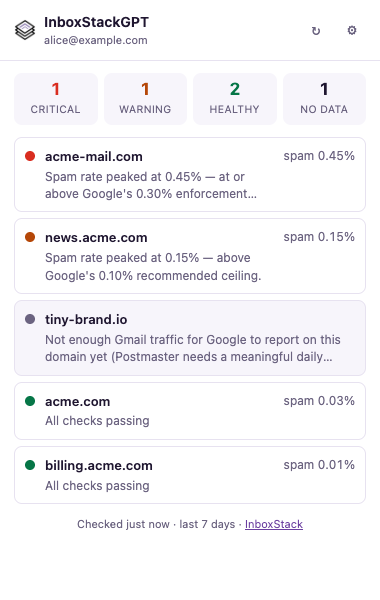
5 domains checked over the last 7 days: 1 critical, 1 warning, 2 healthy, 1 without enough Gmail traffic to report.
- acme-mail.com — critical. Spam rate peaked at 0.45%, above Google’s 0.30% limit.
DMARC policy is missing and one-click unsubscribe isn’t set up. Publish a record at
_dmarc.acme-mail.comand addList-Unsubscribe-Postheaders first. - news.acme.com — warning. Spam rate reached 0.15%, above Google’s 0.10% target. Suppress recipients who haven’t opened in 90 days.
acme.com and billing.acme.com pass every check.
Set up in a minute
Add it to the assistant you already use.
- 1In Claude, open Settings → Connectors and choose Add custom connector.
- 2Name it InboxStackGPT and paste
https://gpt.inboxstack.com/mcp. - 3Click Connect, sign in with Google and allow read access to Postmaster Tools.
- 4Start a chat and ask: “What’s the health of my domains?”
What you can ask
Questions you’d otherwise answer by clicking through Postmaster, one domain at a time.
- “What’s the health of my domains?”
- “Which domains are over Google’s 0.3% spam limit this week?”
- “Why is acme-mail.com non-compliant, and how do I fix it?”
- “Show news.acme.com’s spam rate for the last 30 days.”
- “Which of my domains are missing one-click unsubscribe?”
What it checks
Everything Google reports in Postmaster Tools v2.
Spam rate
Daily user-reported spam rate against Google’s 0.10% target and 0.30% limit.
SPF and DKIM
Whether Gmail sees every message authenticated.
DMARC alignment and policy
Whether your From domain lines up, and whether a DMARC record exists.
TLS encryption
Whether your mail arrives over an encrypted connection.
DNS records
Forward and reverse DNS for your sending IPs.
One-click unsubscribe
List-Unsubscribe-Post headers on marketing mail, and whether unsubscribes are honored.
Delivery errors
Rejects and temporary failures, by type.
Subdomains
Google’s compliance verdict for subdomains as well as the parent domain.
Your data
Read-only, and your Google tokens never leave InboxStack.
- Read-only scopes. InboxStackGPT can list your Postmaster domains and read their traffic and compliance data. Nothing else.
- Encrypted at rest. Google tokens are encrypted on InboxStack’s server. Claude, ChatGPT and the extension get their own short-lived InboxStackGPT tokens instead.
- Only your domains. Every request is checked against the domains your own Google account can see.
- Not for ads or model training. Postmaster data is used only to answer your questions. Read the privacy notice.
Questions
Is it really free?
What does InboxStackGPT need access to?
My domain shows “no data”. Why?
Does Claude or ChatGPT see my Google password or tokens?
How do I disconnect?
Is there a browser extension?
A client asked what is going on?
Answer with a report, not a guess.
InboxStackGPT shows what Google sees. Run a free audit to check the headers and DNS behind a single message.